Put your Mac mini / Mac Studio
to work around the clock.
Hosting and colocation in a Tokyo data center. Your Mac runs on data-center-grade power and networking, reliably, 24 hours a day, with the uptime that an office or home setup can't easily match. A practical home for the local AI and services you build.
Questions about setup, maintenance or service? Contact us at info@machosting.jp
We install your Mac mini / Mac Studio, or a Mac mini / Mac Studio we rent to you (hosting), in our data center so you can use it 24 hours a day. The data center has earthquake-resistant construction, security and fire-suppression systems, so you can use the full range of macOS features without worrying about keeping a machine running yourself.
We house your Mac mini / Mac Studio in our data center. We can also supply the Mac together with the service if you prefer.
A rental plan: you use a Mac mini / Mac Studio that we have installed in our data center.
* Mac Studio hosting is quoted individually, depending on the model and configuration you need. Please contact us to discuss.
You get administrator privileges and the freedom to use macOS features as you like.
Rack space in an earthquake-resistant, fully secured data center in Tokyo.
Power is included in the fee, supplied by the data center's power facilities.
One global static IP address is assigned to you.
You can operate under your own domain.
Up to 100 Mbps, or up to 1 Gbps with the optional upgrade (both best effort).
Email support, weekdays 10:00–18:00 (Japan Standard Time, UTC+9).
Technical staff respond depending on the case.
Log in to your own user page to see the state of the Macs we host for you at any time. It shows CPU, memory and disk usage, load, uptime, model and OS information, and network traffic, with graphs for the last 24 hours, 7 days and 30 days. If you run several Macs, you get an overview of all of them and tabs to switch between machines.
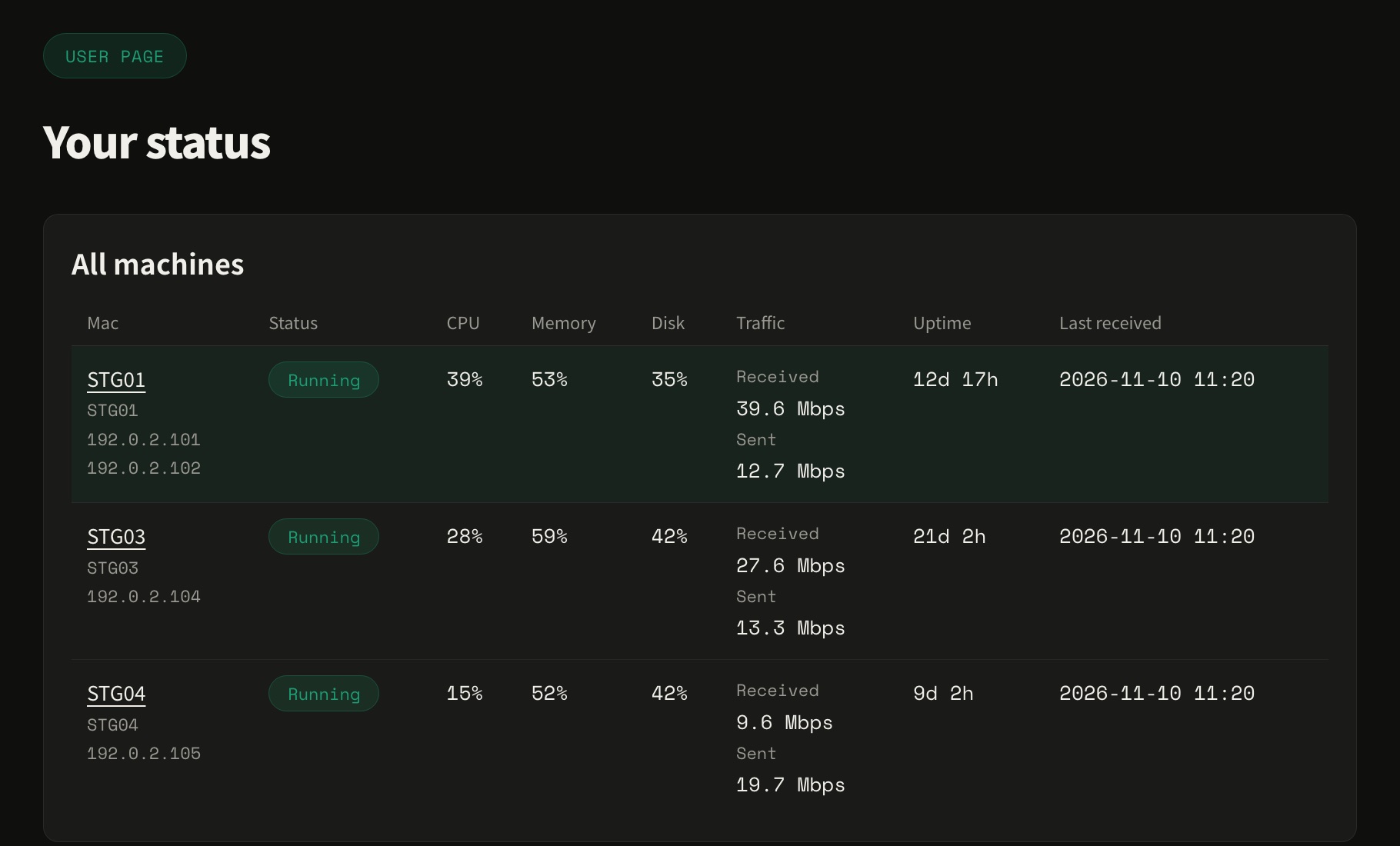
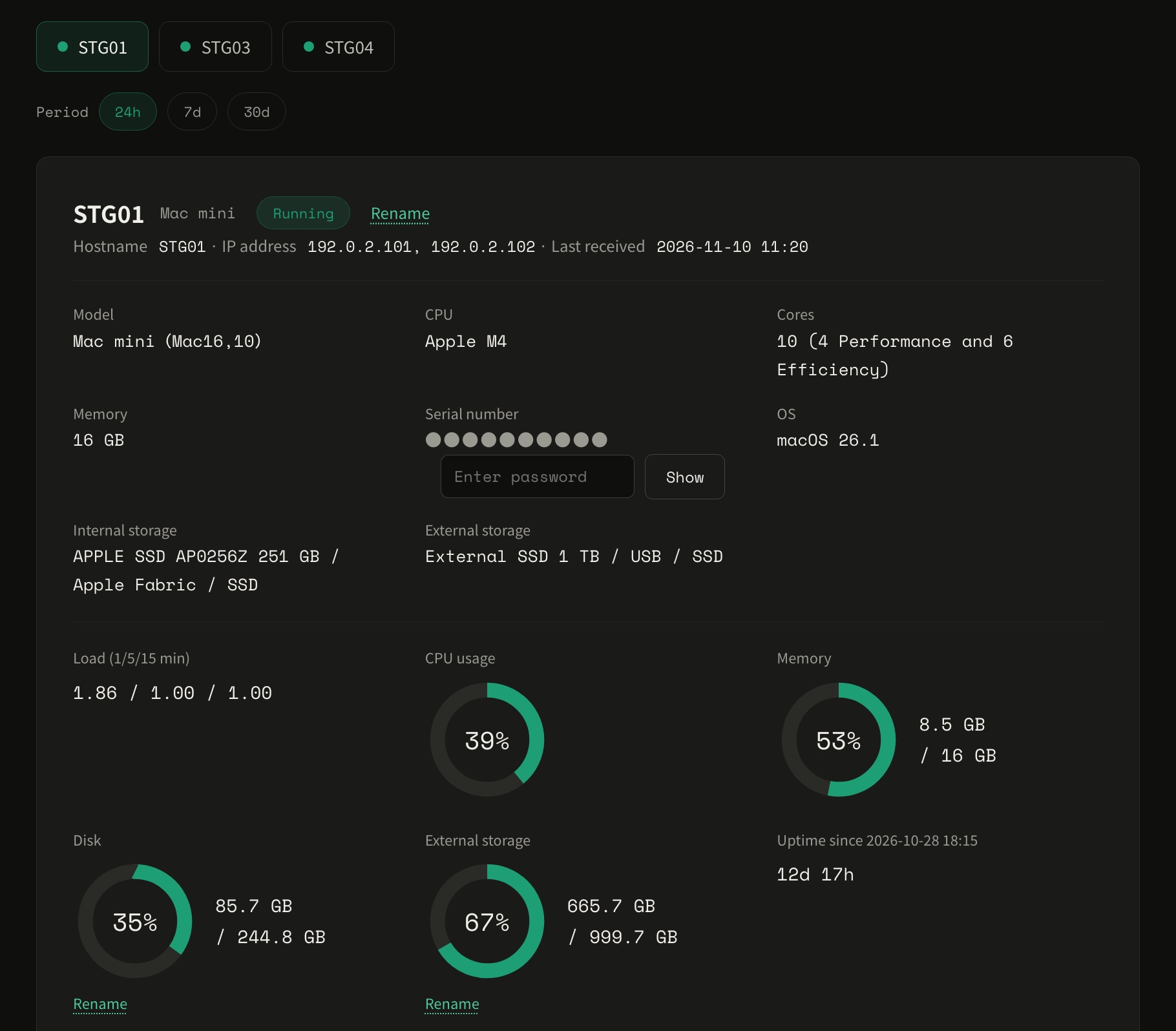
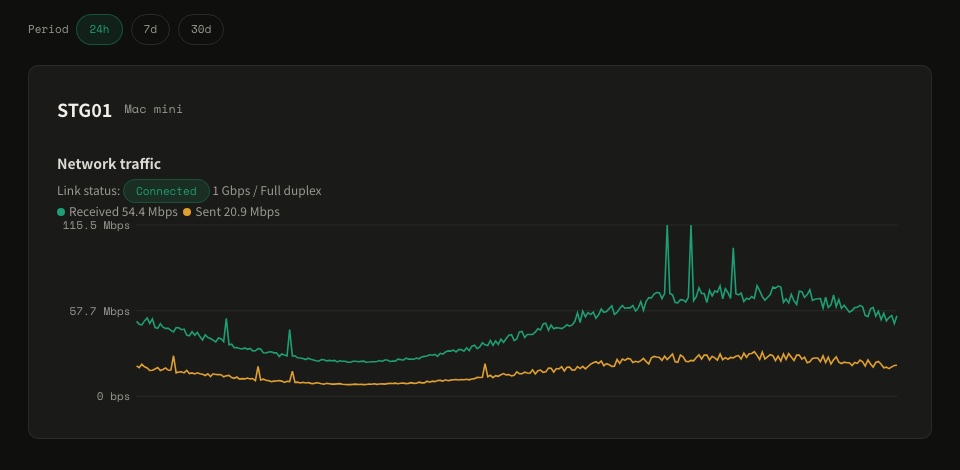
* Screens are illustrations using dummy data. The user page is also available in Japanese.
* The user page requires a small collection agent program on your Mac. We set it up for you; please contact us if you would like it.
The initial fee and the first monthly fee are billed in the month your service starts. All prices are in Japanese yen (JPY) and include Japanese consumption tax.
We host your own Mac mini
We host your own Mac Studio (Max chip models)
We host your own Mac Studio (Ultra chip models)
We rent you our Mac mini (M4 chip, 16 GB memory, 256 GB SSD)
We rent you our Mac mini (M6 chip, 16 GB memory, 256 GB SSD)
We rent you our Mac mini (M5 Pro chip, 24 GB memory, 512 GB SSD, 15-core CPU, 16-core GPU)
We rent you our Mac Studio (Max / Ultra chip models)
* Mac Studio hosting is quoted individually. Please contact us through the inquiry form.
* New applications for Mac mini M4 hosting are temporarily paused. If you are interested, please contact us through the inquiry form.
* Hosting for the M6 and M5 Pro Mac mini is planned. If you are interested, please contact us through the inquiry form.
* The Max / Ultra price tiers for Mac Studio apply to new contracts from November 6, 2026.
* Lead times of "about 1 month" include the time to order the machine.
* All prices are in Japanese yen and include Japanese consumption tax.
* Applications are currently accepted through the inquiry form. Please tell us the plan you want and we will reply by email.
Common specifications, optional services, payment and notes for all plans.
| Included in the service | · Administrator access · Rack space in an earthquake-resistant, fully secured data center in Tokyo · Electrical facilities · One global static IP address (operation under your own domain is possible) · Internet connection up to 100 Mbps (up to 1 Gbps with the option; both best effort) |
| Supported machines (Mac mini colocation) | Your own Mac mini * Older models from 2010 to 2023 can also be supported. |
| Supported machines (Mac mini hosting) | Mac mini M4 / M6 / M5 Pro * Each plan is provided with the lowest-spec model. Hosting for the M6 and M5 Pro is planned. |
| Supported machines (Mac Studio colocation) | Your own Mac Studio * Models with a Max chip fall under the Mac Studio Max plan, and models with an Ultra chip under the Mac Studio Ultra plan. |
| Supported machines (Mac Studio hosting) | Mac Studio (Max / Ultra chip models) * Quoted individually according to the model and configuration you need. |
| Time Machine / backup disk | If you provide one external 2.5-inch hard disk or SSD (USB Type-C or Thunderbolt), we install it at no extra charge (up to one disk). |
| Support | Email support, weekdays 10:00–18:00 (Japan Standard Time). Technical staff assist depending on the case. Support for building or configuring your services is available as a paid service. |
| Option | Price (tax included) |
|---|---|
| 1 Gbps connection (up to 1 Gbps, best effort) | ¥2,200 per month (no initial fee; expect a few seconds of interruption when switching) |
| Device uptime monitoring (ping) | ¥5,500 initial / ¥550 per month |
| Domain registration and setup | ¥5,500 per year |
| Service building and maintenance | On request |
| Installation of a specified OS | ¥22,000 initial (colocation with your own machine only; depends on the model) |
| 24/7 incident response support | ¥11,000 per month (up to 5 machines per contract; please ask about 6 or more) |
| Billing and payment | The initial fee and the monthly fee are billed in the month your service starts. Billing closes at the end of each month, with payment due at the end of the following month. If you start partway through a month, the monthly fee is prorated by day. Payment methods: bank transfer, invoice payment, or direct debit. |
- Our service provides power and network connectivity. Operations inside macOS are the customer's own responsibility.
- Scope of service and responsibilities
- Building services and answering questions about how to configure them are outside the scope of the standard service, but we offer them as a paid service. Please feel free to ask.
- Software updates and restarts are performed at your own discretion. We do not perform them without your request.
- We do not provide a firewall. Please set up the macOS firewall or install firewall software yourself.
- For security reasons, we turn off the "Bonjour" feature.
- Facilities and power
- The data center power is divided into several circuits. We assign the circuit each machine is connected to, depending on rack space and power availability. We cannot accept requests to specify a circuit.
- The data center is equipped with UPS (uninterruptible power supply), but we do not guarantee that your machine keeps running during a power outage.
- By design, a Mac mini / Mac Studio cannot be powered on remotely. If a power-on or reset is needed because of an issue on the customer's side, we handle it on site for a fee of ¥550 per occurrence.
- Mac Studio's LOM (Lights-Out Management) feature is not available.
- Customers cannot enter the data center.
- After you sign up
- To configure the network and firewall software and to set up the collection agent, we ask you to create an administrator account for us. We never operate your Mac without your request.
- After you sign up, please send requests about the network, the administrator account and the firewall from "Account settings" > "Settings" on the user page.
- Sending, returning and repairing machines
- Shipping costs for the machine are borne by the customer.
- If you send several machines, please write the host name on each machine and its box.
- If you wish, we return the packing box by cash on delivery (at your expense) after the setup. If you do not need it back, we dispose of it.
- Replacement and repair of faulty equipment, including hard disks, are charged separately.
- The Terms of Service are available in Japanese only. See the Japanese Terms of Service.
Either buy a Mac mini / Mac Studio yourself and ship it to us, or have us buy it for you. If you buy it yourself, please purchase from us or from an official Apple Store.
After you sign up, we send you a setup guide. Please set up the Mac by following it.
Our staff handle all of it, including cables. Installation is included in the initial fee. It takes about 1 week if you buy the Mac, or about 1 month (including ordering time) if we buy it.
You access your machine with remote software such as Remote Desktop, Screen Sharing or SSH. If you register your own domain through us, we also set up the DNS records.
We return your machine to you promptly.
Apply About 1 month after you apply (including ordering time), we set up the machine and hand over the administrator access and settings. You can start using it right away.
The data center that houses your machine has power receiving and transformer equipment, fire suppression, security, earthquake resistance, a support organization and entry/exit control, so operations can continue safely.
Power receiving and transformer equipment, fire suppression, security, earthquake resistance, support organization and entry/exit control are all in place.
The data center's network is monitored 24 hours a day, 365 days a year.
| Location | Tokyo, Japan |
| Power supply | 66 kV extra-high-voltage supply (loop receiving) |
| UPS (uninterruptible power supply) | N+1 (parallel redundant) |
| Emergency generators | Gas turbine generators × 2 (N+1) 72 hours of fuel reserve |
| Air conditioning | Air-cooled individual units, N+1 redundant Room setpoint 24°C ± 3°C / humidity 50% ± 20% (target values) |
| Airflow design | Cold aisle: raised-floor supply / hot aisle: ceiling return Partial aisle containment |
| Fire suppression | Nitrogen gas fire suppression system |
| Fire alarms and smoke detectors | Installed on and above the ceiling, ultra-high-sensitivity smoke sensors |
| Surveillance cameras | Cameras on every rack row (recordings kept for 90 days) |
| Operations and monitoring | 24/7, 365-day operations and monitoring |
Put your Mac to work, around the clock.
Questions about setup, maintenance or service? Please get in touch.
Applications and inquiries are accepted through our inquiry form.